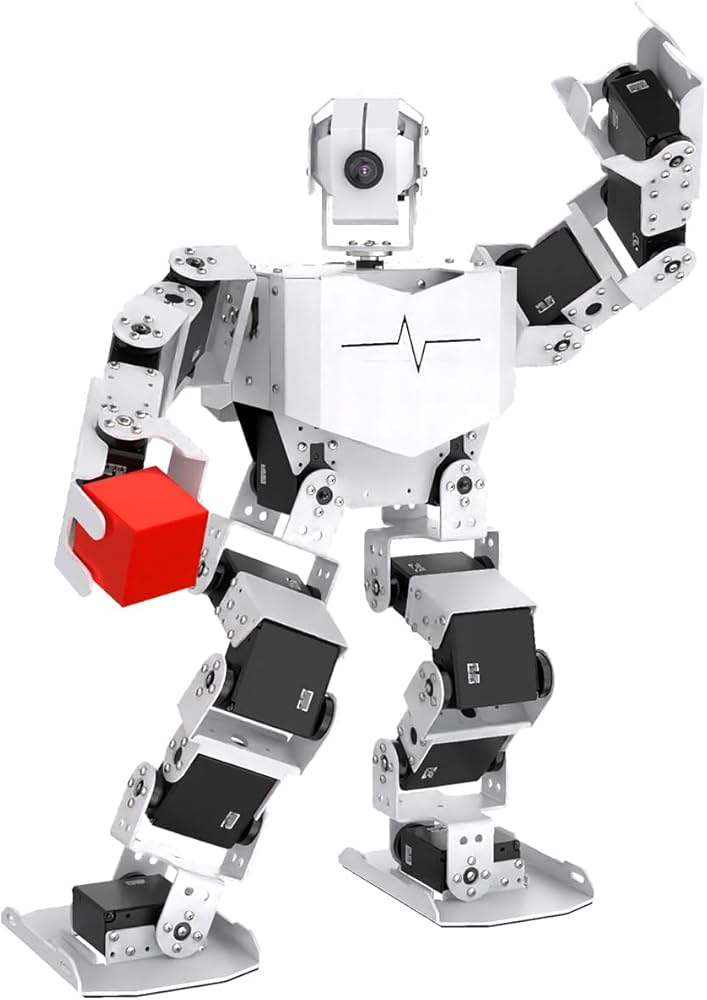
The Hiwonder TonyPi Pro is a desktop humanoid that takes the usual “walk, dance and kick a ball” kit and adds two things: hands that open and close, and a conversational AI layer built around ChatGPT. It runs on a Raspberry Pi 5, uses a head camera for OpenCV vision, and listens through a voice module. If you want a small robot to experiment with computer vision and voice-driven behavior, it is one of the more capable kits in our lineup.
This profile summarizes what Hiwonder says about the TonyPi Pro, explains who it suits and lists what to check before you buy. We did not build or run the robot ourselves. We compared the specifications on Hiwonder’s own product page and turned them into a plain-English guide. For how it compares with the other humanoids you can actually buy, see our guide to the best humanoid robots of 2026.
The Short Version
Hiwonder describes the TonyPi Pro as an AI humanoid robot built on the Raspberry Pi 5 with high-voltage serial bus servos and an HD camera, programmed in Python. The company lists tasks such as color recognition, target tracking, ball shooting, line following, somatosensory control and AI-interactive games. The Pro version adds hand-eye coordination: with open-close hands and vision, it can grasp, sort and carry small items.
The trade-off is scope. It is a kit that rewards tinkering. The AI features depend on cloud models that you set up yourself, and the robot is small and light, so the tasks are tabletop demos, not chores.
Configuration in the Amazon Listing
Hiwonder’s page offers Raspberry Pi 5 configurations with 2GB, 4GB, 8GB and 16GB of memory, plus an “Upgraded Pack” option. The Amazon listing we are profiling is the Raspberry Pi 5 8GB configuration of the Pro. The Pro Kit is the 20-DOF version with open-close hands, according to Hiwonder’s table, which lists 18 DOF for the Standard and Advanced kits. The product page text we read does not spell out what the Upgraded Pack adds, so check the packing list and the Amazon listing contents before you order.
Key Specs According to Hiwonder
All of the following comes from Hiwonder’s official TonyPi Pro product page.
- Degrees of freedom: 18 DOF for the Standard and Advanced kits, 20 DOF for the Pro Kit. Hiwonder says the body has 18 DOF plus 2 more from the open-close hands, and the head adds 2 DOF for visual exploration.
- Size: about 14.7 x 7.3 x 4.2 in (373 x 186 x 106 mm).
- Weight: about 4 lb (1,800 g).
- Battery: 11.1V 2,000 mAh 10C lithium battery, with a working time of about 60 minutes.
- Controller: Raspberry Pi 5 with a Raspberry Pi expansion board, in a dual-controller design.
- Camera: 480P HD wide-angle camera on the head.
- Servos: LX-824HV bus servos and LFD-01M anti-blocking servos.
- Connectivity: Wi-Fi and Ethernet.
- Control: app, PC software and a wireless controller.
- Hand opening: Hiwonder says the robotic hand can open up to about 2.6 in (66 mm).
The camera and OpenCV are the foundation of most demos. Hiwonder says the robot can stream video, recognize colors, identify tags and follow colored lines, using PID control to lock on to targets. A face-detection feature built on MediaPipe lets you program a response when a face appears.
Tag recognition is a handy tool for projects: the page says the robot can interpret tag codes and calculate each tag’s position and orientation, so you can design custom reactions. During line following, Hiwonder says it can also detect hurdles and stairs, then cross or climb them. Because the camera is 480P, think of these as well-lit classroom demos rather than precision vision work.
The ChatGPT and Multimodal Layer
The headline feature is the AI interaction. Hiwonder says the TonyPi Pro integrates a multimodal large AI model through OpenAI’s API and can switch to other models, such as those offered through OpenRouter, for vision-language applications. A voice interaction module (the page shows a WonderEcho Pro AI voice box) handles speech. Hiwonder describes this as a move from semantic understanding to physical execution: you speak, the model interprets, and the robot acts.
Two practical notes follow from that description. First, the model runs online, so you need a network connection and your own API access, and your usage terms come from the model provider. Second, a conversational layer on a small, light robot is a demonstration of embodied AI, not a replacement for a household assistant. It is exciting for a classroom and a good way to learn how language models connect to robot actions.
Software and Skill Level
Hiwonder says TonyPi Pro supports Python programming and comes with tutorials and source code on its wiki. You can control it from an app, from PC software and from a wireless controller, which makes it friendlier than a pure code-only platform. For a first session, the action-editing software and app are the easiest path. For vision and AI, expect to work in Python, connect over Wi-Fi or Ethernet, and be comfortable with Raspberry Pi and Linux.
That makes the TonyPi Pro a good match for teens who already code, adult beginners willing to read tutorials, and teachers who can guide a class. It is a less natural choice for a young child or for someone who wants something that works with no setup.
Who It Is For
- Teens with coding experience who want a project that combines robotics, vision and AI.
- Adults and hobbyists exploring embodied AI on a desktop platform.
- Classrooms and clubs that need a robot with documented tutorials and several control options.
- Makers who want to experiment with OpenAI-style models connected to a physical body.
If you want a collector’s display piece, look at the Robosen Buzz Lightyear. If you want a ROS-based research-style platform, look at the Hiwonder AiNex.
What to Know Before You Buy
- Match the kit level. The Pro Kit has the open-close hands and 20 DOF. Check the Amazon listing title and contents against Hiwonder’s packing list.
- Confirm the memory size. The listing we profiled is the Raspberry Pi 5 8GB version. Hiwonder also offers 2GB, 4GB and 16GB.
- Plan for assembly and setup. The page text we read does not state how much assembly is needed. Treat it as a kit and read the setup tutorials first.
- Budget for the AI services. The large-model features use OpenAI’s API or alternatives, which are separate from the robot.
- Check the runtime. About 60 minutes on one charge is Hiwonder’s figure. A second battery or a break between sessions may be useful.
- Think about the room. At a largest dimension of about 14.7 in (373 mm), it works on a desk or a table, and a clear surface helps for hurdle and stair demos.
- Supervise charging. Lithium batteries need proper chargers and storage; follow Hiwonder’s instructions.
Pros and Cons
Pros
- Raspberry Pi 5 with open-close hands for grasping and sorting
- OpenCV vision with color, tag and face detection
- Multimodal AI voice features through OpenAI’s API
- About 60 minutes of runtime and a compact body of about 4 lb (1.8 kg)
- App, PC software and wireless controller options
Cons
- The AI features depend on cloud access and your own setup
- 480P camera limits finer vision work
- Requires patience and Python skills to unlock the best features
- Tabletop-scale tasks only
TonyPi Pro vs. the Neighbors
Against the Hiwonder AiNex, the TonyPi Pro puts conversational AI and ease of control first, while the AiNex puts ROS and a higher joint count first. Against the Hiwonder Tonybot Ultimate, the TonyPi Pro uses a Raspberry Pi 5, while the Tonybot uses an ESP32 controller and supports Arduino and Scratch as well as Python, which makes the Tonybot a gentler starting point.
Who Should Skip It
Skip the TonyPi Pro if you want a finished robot that works out of the box, if you do not want to program, or if you expect a household helper. It is a strong learning platform that is best judged on that basis.
You can check the current price and options here: Hiwonder TonyPi Pro on Amazon. Buying through our link may earn a commission at no cost to you.
Sources